


Virtual Proctoring

Participation validation made easy!

Confirm who is really completing your online training

Over the past few years, industry has seen an increasing demand and need for online training. With more and more workers working non-standard hours and many companies hiring sizable groups of contract workers, work-based learning has had to become more flexible to accommodate the shift in company needs. While online courses have helped to make onboarding and training processes more efficient, convenient, and cost-effective, with this flexibility has come uncertainty. When workers complete training away from the supervision of a classroom, how can companies be sure the people taking the training really are who they say they are? The challenge has become finding a way to meet the changing needs of industry while still ensuring the integrity of course completions.

The solution may be simpler than you think.

What is Virtual Proctoring?

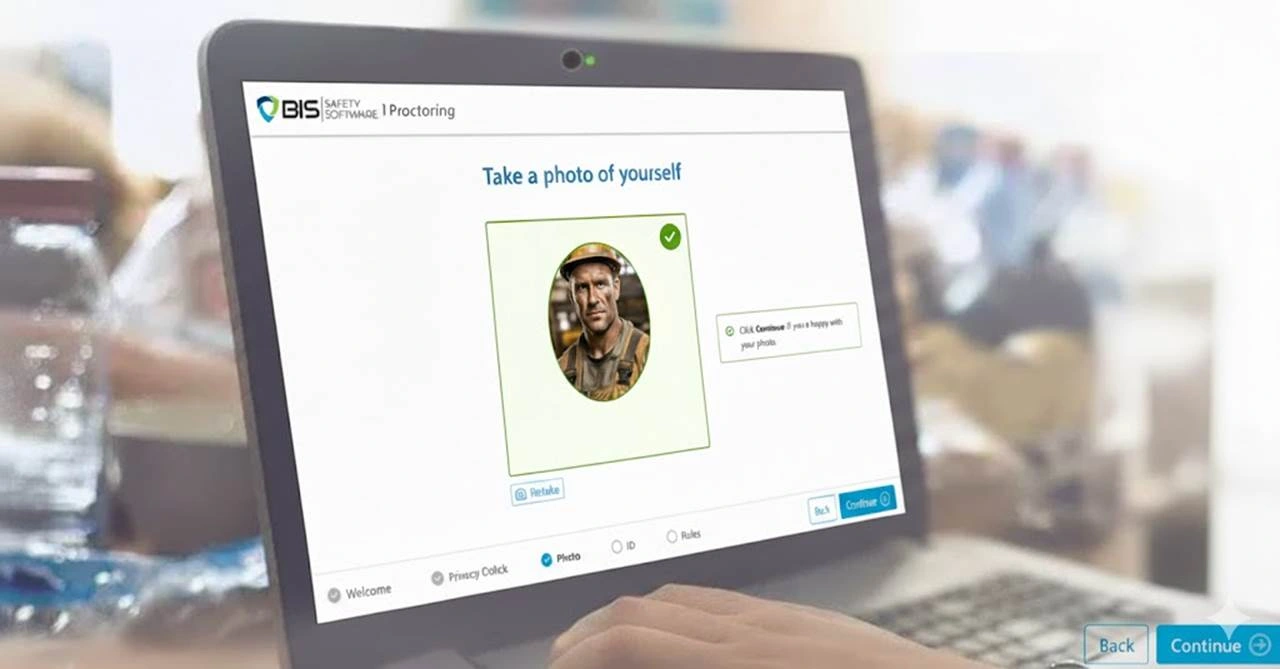
Virtual proctoring is the use of web-based technology to supervise an exam or the delivery of educational material, including online courses, exams, and even form completions. By using facial detection and recognition technology, the software allows you to verify the identity of the learner and ensure learners are following the session rules. This means that it not only verifies identity, but also whether or not users are paying attention. All of this is done using the capabilities already built in to web browsers and webcams, so no additional software is required to install.

Privacy for Virtual Proctoring

BIS Safety Software uses an advanced technology to request permission to the user’s webcam for the purposes of verifying their identity and validating that they were paying attention during the course. At the start of the process the system will request that the use present their government issues photo identification and their themselves to the webcam. An image of the driver’s licence is digitally stored in an encrypted format and only used to verify the user’s identity, once verified, the encrypted image file is permanently purged from the database entirely. All driver’s encrypted driver’s licence images are purged within 24 hours of the course being taken.

The Potential

Save Time and Money

Converting your training sessions and orientations to an online platform allows workers to complete training before they arrive on site. This not only minimizes the loss of productive time, but also ensures there are no logistical delays involved with preparing and organizing content, booking training facilities, or marking exams. With virtual proctoring, you can also minimize the costs of trainers and exam supervision, all the while ensuring consistent ID verification.

One of our largest industry clients has saved millions of dollars by moving their project’s orientation online and integrating our virtual proctoring tool. To help illustrate the cost savings, the following is a sample budget comparison, modeled after and scaled accurately to the numbers given to us by our client.

Estimated Costs for Instructor-Led Orientation

Approximate Total Cost: $5,000,000

Productivity Loss: / 63%

Trainer Costs: / 6.4%

Facility Costs: / 30.3%

Savings Using Virtual Proctoring & Online Training

94%

Estimated cost savings based on a development and implementation cost of $285,000 versus the projected $5,000,000 for the onsite orientation.

Ethics Enforcement

As the user’s webcam records the session, the software monitors for any deceptive behaviour displayed during the session. Deceptive behaviour is then flagged. Examples of deceptive behaviour include users placing images in front of the camera or switching participants after showing their ID. In monitoring and flagging these types of behaviour, virtual proctoring can help you identify and prevent unethical behaviour before it occurs on site. As the statistics below show, 6.4% of participants were flagged during virtual proctoring sessions due to not following the outlined session rules and/or deceptive behaviour.

Session Data Summary*

Verified Sessions (No Issues) / 82.8%

Administrative Flags** (majority cleared) / 10.8%

Participation Flags*** / 5.8%

Deceptive Flags / 0.6%

*Taken from a sample size of just over 15,000 participants across 5 courses (Aug 2016)
**ID or participant image could not be verified
***Participant failed to follow the rules of the session

Proctoring Validation Levels

Our learning management software uses advanced artificial intelligence (AI) technology to monitor online courses and exams by analyzing video and computer activity to ensure exam integrity.

Pricing is subject to change. Please contact our Sales Team at
sales@bistraining.ca to confirm pricing details.
Level 1
$9*
Level 2
$11*
Level 3
$14*
Level 4
$18*
(future)


Name & Photo ID Match
Participants must submit a valid government-issued photo ID.


Within Camera View
Participants must remain in view of the camera for the duration of the activity.


Active Participation
Participants must remain engaged throughout the session.


No Other Participants
Participants may not receive help from or communicate with others.


No Other Materials
Participants may not use any external resources (e.g., books, notebooks, etc.)


No Electronic Devices
Participants may not use extra electronic devices, such as phones or tablets.


No Headphones
Participants may not use headphones for the duration of the activity.
slash-display

Single Monitor Only
Participants can only use one monitor for the duration of the activity.
slash-display

Full View of Monitor
All content on the participant’s monitor is tracked and recorded (i.e., screenshots)


Screen Monitoring
Participants may not leave the full-screen window, open other browser tabs, or open other programs.

Legal Protection

When you make proctored sessions mandatory for your online training sessions, you are able to prove compliance to regulatory requirements. Usernames and password are not enough to confirm identity, nor an individual’s participation in training. But with virtual proctoring, if an incident occurs despite the allocated training, you possess recorded proof of the individual undergoing and completing the required training, which provides a defense against potential litigation.

Due Diligence

The importance of safety compliance is nothing new to HSE professionals. We know that we must do everything reasonably practical to prevent workplace incidents, but having policies in place and offering training is not necessarily enough. Meta-analytical investigations have shown that the level of engagement in safety training is directly related to safety performance within organizations. Ensuring workers are engaged with online training is made easy when virtual proctoring is implemented.

Action Plan!

LMS Software Vendor Security Checklist

Evaluate Vendors and Plan Your LMS Rollout with Confidence

This checklist gives you the tools to:
  • Evaluate LMS vendors against compliance requirements
  • Plan a structured and defensible rollout
  • Identify risks in data migration and configuration
  • Compare vendor capabilities across core LMS functions
  • Define success metrics before implementation

Robert Day

Licensed Investigator and Paralegal

“Court cases such as R. v. Rose’s Well Services Ltd. illustrate that employers need to ensure that they do more than provide training access. These cases show that there is a need to ensure that the personnel requiring the training are the ones receiving it.”

Jason Kraft

Occupational Health and Safety Administration (Officer)

“When training is delivered online an employer needs to confirm that the individual taking the training is the intended recipient, and that the employee did not just click play and walk away, or have others complete the training or answer comprehension testing questions for them.”

Ready to Get Started?

With many workers working non-standardized hours, our Virtual Proctoring will allow your company to keep your employees focused and in attendance. Virtual Proctoring also allows your employees to engage with some of the many Online Courses we have with no fear of them missing information.

Find out how to use this system with these three easy steps.

Step 1 – Contact Our Team

If you are ready to utilize Online Orientations, reach out to our team and let them know you would like to get started! They can answer any questions and get things rolling.

Step 2 – Launch Your Branded Portal

Once our team has helped you get started, you can begin creating your orientations for any purpose and explore the features of the system as you learn.

Step 3 – Professional Onboarding

Once you have created the forms and orientations, you can distribute them to your valued staff and analyze the results to see the impact it has on your organization.

Learn more about the power of virtual proctoring!

If you’d like to learn more about the power of virtual proctoring or see how you can host your onsite orientation through us, let us know!