
Digital Folders
Cloud-based storage system
Digital Folders – Cloud-Based Storage
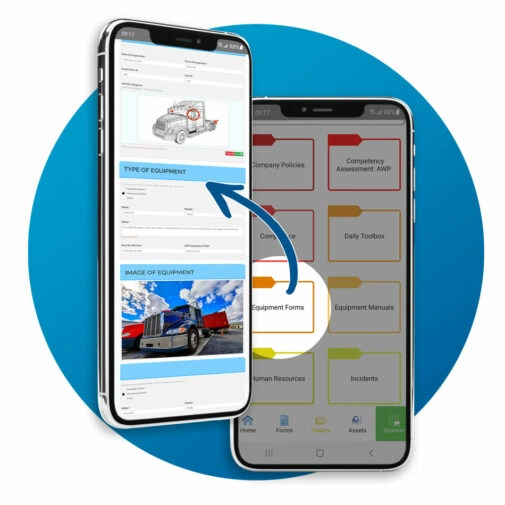
Secure Online Document Storage, Access, and Sign-Off
Similar to folders on a desktop, BIS Safety Software offers the ability to upload multiple documents and files into a cloud-based storage location for your team. Once uploaded, this feature offers extensive options for providing employees easy access to company documents, reporting on acceptance and sign-off as well as automated expiry alerts and reassignment. Features include:
- Sign-off Reports
- Digital Signatures
- Mobile Compatibility
- Permission Management
Create hundreds of compliance folders that include:
Sign-Off
Reports
Digital
Signatures
Mobile
Compatibility
Permission
Management
STEP 1 - Upload Company Documents and Policies
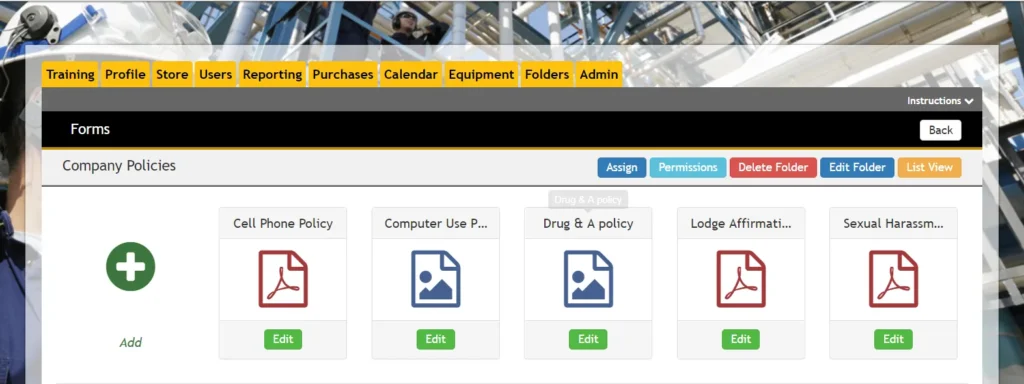
Once you create a folder, you can upload Microsoft Word documents, PDF policies or procedures, Excel spreadsheets, and even digital interactive forms. With all required documents uploaded, you can set up specific rules for each document, such as who can access them, who can edit them, if a digital signature is needed, the affirmation statement wording, and more.
STEP 2 - Assign Access Rights and Permissions
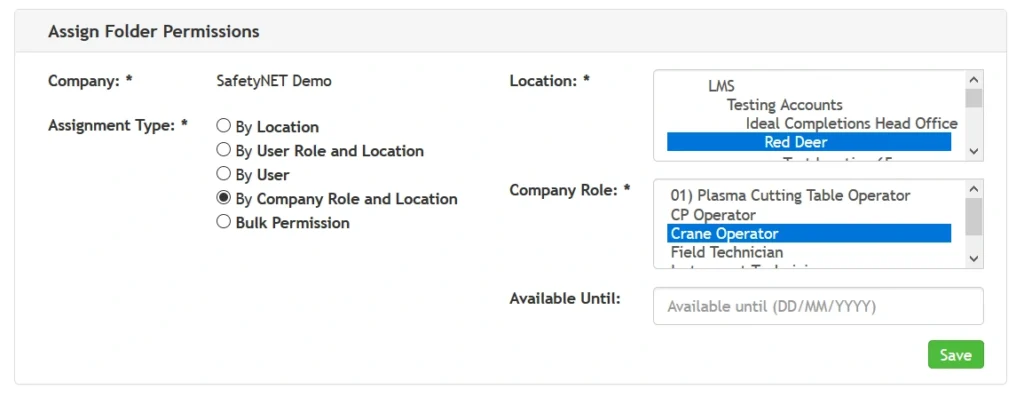
Using the advanced permission management system, administrators can map out specific user access to edit the folders as well as employee assignments for sign-off requirements. Using the Assignment Type Selectors, you can choose from assigning a folder by location, system role, company role, or a combination like Company Location and Company Role (e.g. Red Deer and all Crane Operators). This assignment mapping will instantly add the folder to the employee’s home page under their Training tab in the Assigned section for them to access.
STEP 3 - Employee Sign-off on Forms
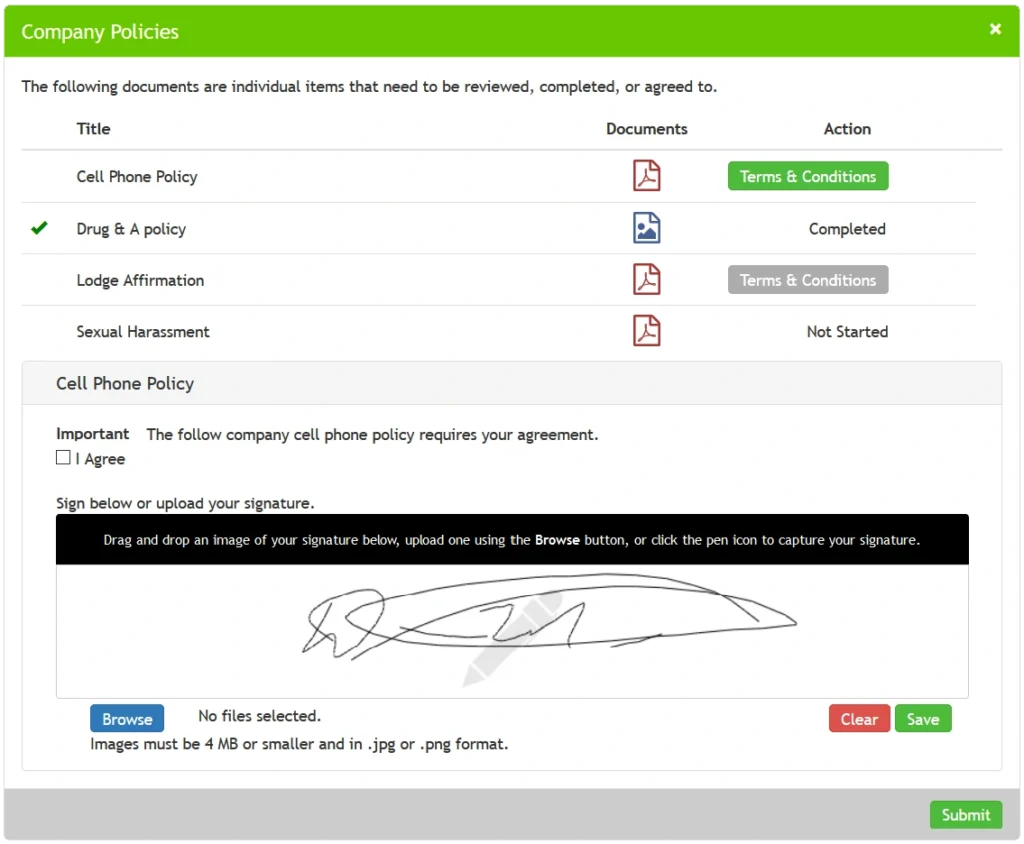
This policies and procedure sign off software provides the ability for the user to click and open the Word, PDF, or Excel document, which activates the Terms & Conditions button and allows the user to read the details, check the affirmation statement, and digitally sign off on the company policy.
As employee sign off on the forms under the Assigned section on their home page, the folder moves to the In Progress section. When all forms have been signed off or completed, it moves to the Completed section.
When a document is updated or expires, the folder automatically moves back to the Assigned section, alerting the user of the new requirement to sign off. Once signed off again, the folder returns to the Completed section.
Included in this document management feature is advanced reporting for each document and summary reports for the entire company. It also includes individual detailed reports on what forms a particular user signed off on and what forms are still outstanding.
The best part is the ability to highlight updates to a new document. If the company makes changes to a document, you can force a user to open it, ask them to read it, highlight the changes for them, and then ask for a signature upon completion of the review. This compliance based system allows the employee to quickly view the specific changes in a workplace health and safety document while at the same time providing them the full document access for review and tracking their agreement.
The Safety Compliance Folder System is an online document management system. This means the software can store multiple documents in the cloud for easy and instant access. From cloud secure online document storage, employees can sign off by appending digital signatures that are instantly captured and stored. Better yet, the cloud based document management system is compatible with smartphones, whether android or IOS powered.
One of the most helpful features of the online document management system is its ability to capture documents from any source and give you the tools to organize them. The document management software is not only able to store digital copies of paper documents, but it can also do custom indexing to classify documents in a way that will be easy for you to find later.
Permission Management
When you create a folder, you choose if it will be accessible to specific locations within your company, to all locations, to select users, or to all users. Once created, you can use the advanced permission management system to assign the folder and all its contents to groups based on their role within the system, their company role, or a combination of company role and location. Whoever is assigned the folder will see it on his/her homepage under Assigned.
Streamlined Sign-Off
When users open a folder, all of its contents are accessible in an easy-to-view list and ready to be read and/or completed. Each file within the folder can be set up with a requirement for employee signoff and agreement. Simply include a message when the document is first opened, a terms and conditions statement that needs to be agreed to, and an agreement or affirmation statement with a checkbox and/or signature requirement. As users sign off on policies or procedures, the folder moves to the In Progress section of their homepage. Once they complete all requirements of the folder, it moves under Completed.
Update Management
As industry changes, so do your policies and procedures. When updates occur, the folder system ensures none are missed. Any time a change is made to a file within a folder, the folder returns to each user’s Assigned section of his/her homepage. Any forms that were updated will have a yellow warning icon beside them. You can highlight all changes within the form or in the terms and conditions section, and the employee must sign off on it again before the folder will move back to complete
Document History Reports
Tracking which documents have been reviewed and submitted is easy with this application. Admin users can go into any folder they have access to, select a file, and download a comprehensive history report for that document. This generates an Excel report that details who opened each form and the date on which they signed off.
Some of the Great Companies who use BIS Safety Software




Action Plan!
Privacy Guide for Buying Software
Build Privacy into Your Buying Process
This guide helps you:
- Identify common privacy risks early
- Ask the right vendor questions
- Define data lifecycle expectations
- Strengthen contracts and oversight
- Make privacy part of procurement decisions

Common Questions About Digital Safety Folders
Where is the safest place to keep your digital files?
For safety and compliance records, the safest approach is usually a centralized system that supports access control, backups, and traceability, rather than keeping files scattered across personal devices or unmanaged shared drives.
In practice, safety teams look for storage that supports controlled access by role, consistent backup and recovery, and the ability to show who uploaded, updated, or approved key documents. That matters when you need to defend an inspection record, training certificate, or incident attachment during an audit or investigation.
A good test is simple: can you retrieve the right record quickly, prove it has not been altered without visibility, and show who had access to it when it mattered.
What is the best way to store documents electronically?
There is no single best method for every organization, but safety teams typically prioritize a few requirements when storing documents electronically: centralization, controlled access, and reliable retrieval.
In higher compliance environments, documents are usually stored in a system that reduces duplication and limits edits to authorized roles. It should also support consistent backups and a clear record of changes, especially for documents that may be reviewed later, like inspections, policies, training evidence, and incident documentation.
When assessing options, focus on whether the system supports audit readiness, not just file storage. You want clear ownership, consistent naming, and the ability to find and export records quickly when required.
How do you create a digital folder?
For safety records, creating a digital folder is less about the click steps and more about setting a structure your team will follow consistently.
Start by defining what the folder is for and naming it in a way that matches how you retrieve records later. Many safety teams organize by site, project, record type, and time period, for example inspections by site and year, training records by role or department, and incident documentation by project and date.
Once the structure exists, apply simple rules so it stays usable: consistent naming conventions, limited access for sensitive categories, and clear guidance on where records are filed. Consistency is what makes records defensible during audits and investigations.
What is the best way to store and organize thousands of documents?
When volume increases, folder structures alone can become hard to maintain, especially across multiple sites and users. Safety teams handling thousands of documents typically combine a consistent folder structure with classification rules and strong search.
Instead of relying on deep folder trees, documents are often categorized by attributes like site, date, record type, status, and owner. This reduces time spent hunting for files and lowers the risk of records being filed inconsistently or duplicated.
At scale, the goal is audit readiness and control. That means predictable naming, clear permissions, reliable retention practices, and the ability to pull the right record quickly with supporting context when an audit, incident review, or legal request happens.