Whether you are managing a shop full of welding equipment or an entire fleet of vehicles, it can be a challenge to keep all of your equipment information, maintenance schedules, and documents organized. Some companies try to manually manage their equipment, implementing paper-based systems with huge administrative costs and the risk of documents being destroyed, lost, or simply misplaced. With the right equipment management software, the challenges of manually tracking essential equipment documents and records can be overcome.
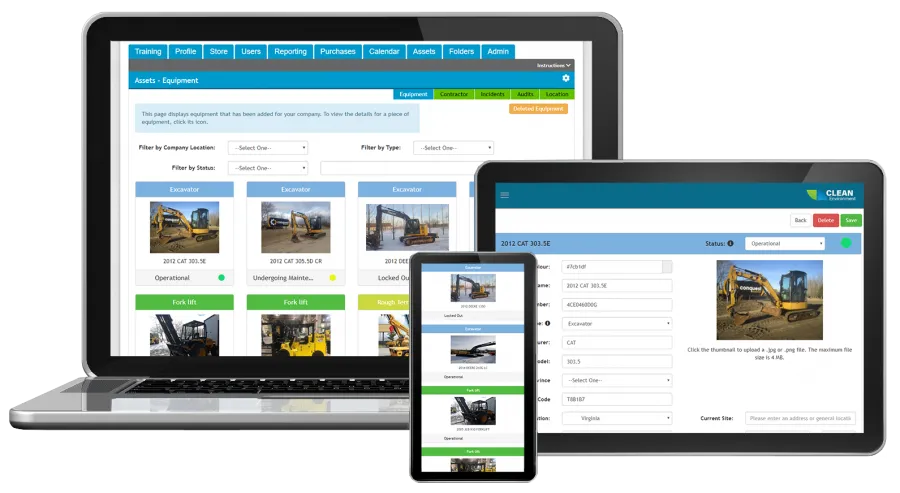
The BIS online equipment management feature simplifies the management process by centralizing all current and historical data into one easy-to-access location for management and operators alike with minimal setup.
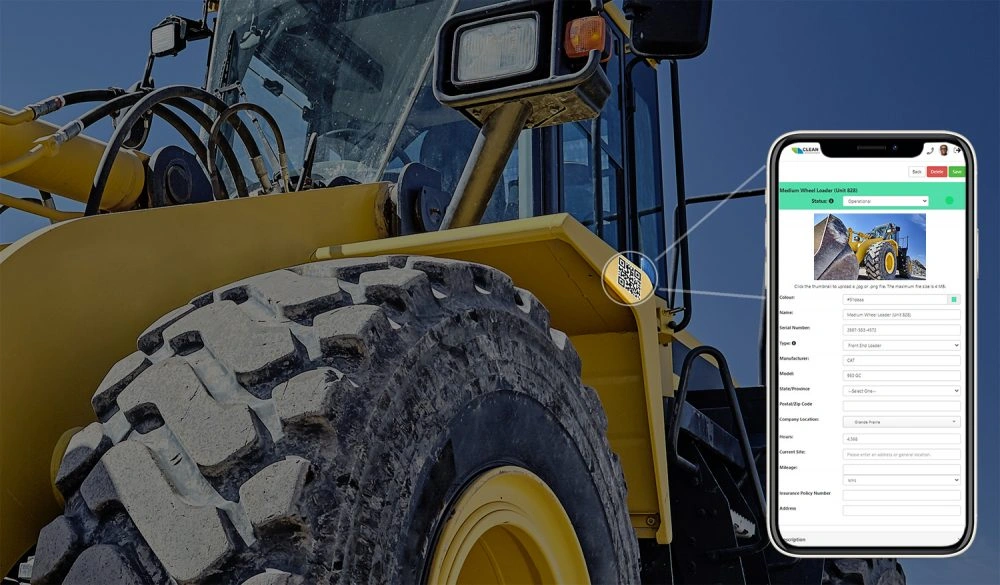
With the integrated QR code functionality, you can add a QR code to any piece of equipment or company asset and access all of its pertenant information, manuals, forms, inspections, and so much more, right from your phone or tablet!

The asset linking feature lets you see who signed out assets, where they’re being used, and if they’re attached to another asset. For example, you can have a fire extinguisher, GPS device, toolbox, and an AED assigned to a company truck. You can then assign that truck to a company supervisor who is responsible for it all.

Keeping track of equipment can be difficult. Common questions like, “What condition is it in?” or “What was the outcome of the last inspection” can take hours to answer. But what if these answers were available anytime, anywhere, on demand with any connected mobile device?
With our innovative equipment management software, location and status are just the beginning of what you can track:
Designate qualified personnel for each piece of equipment. Assign all or select qualified personnel to complete required forms for their assigned equipment. Automate the system to notify personnel at set times and frequencies to complete their pre-shift inspection forms and other daily or weekly required forms.
Track how far each piece of equipment has travelled by entering and viewing the equipment’s mileage in either miles or kilometres. Set completion schedules for inspection and equipment maintenance safety forms so that qualified personnel are notified to complete required forms when mileage milestones are reached.
Enter and track the number of hours that each piece of equipment has been in operation. Then set completion requirements for relevant inspection and maintenance safety forms based on preset hour-of-operation milestones to ensure machinery is meeting manufacturer inspection and maintenance requirements.
Make job planning easy using your tracked information to harness data that shows what equipment is causing problems, what machinery is most frequently used, and where specific pieces of equipment are frequently requested. Track the progress of any identified aesthetic, mechanical, or safety issues from one shared document.
This equipment management feature is fully integrated with an online form builder. Create digital equipment maintenance safety forms, assign them directly to specific pieces of equipment, and set whether these forms need to be completed daily, weekly, or monthly. Assigned personnel can then complete the required forms on demand in the field, instantly uploading the new records without the potential for papers getting lost in the filing process.
Create unlimited pre-shift inspection forms, audits, hours of service logs, maintenance reports, and repair forms for personnel to complete in the field using smartphone or tablet technology.
Customize when and how often forms assigned to each piece of equipment must be completed, and automatically email reminders to specified personnel to ensure procedures are followed and inspections aren’t forgotten.
Allow personnel to import videos and images into submitted forms, and communicate form completion expectations and requirements to your personnel via video.
Specify fields in your equipment’s assigned forms to trigger maintenance tickets, then have qualified personnel track and manage the maintenance status in real time.
Set automated notifications to trigger when personnel identify defects, maintenance concerns, or potential safety issues. Additionally, created automated alerts that will notify management if notifications go unaddressed for a specified time period.
Have on-demand access to reporting for completed forms as well as access to all outstanding forms to help make monitoring and managing equipment easy.
Let our user-friendly software help make your equipment management processes organized and efficient.